
Tag: blogger tips
-
Create Horizontal Navigation Bar From Blogger Link Lists
Adding a navigation bar (menu bar) to your blog will make it easier for your blog readers to discover some important pages of your blog. You can add it to the header section, the sidebar or down the footer section of your blog. Right on this blog, I have explained how to make a navigation…
Written by

-
How Can I Place ‘Advertise Here’ Banner On My Blog?
Selling ad spaces on your blog is one of the blog monetization methods you can use in earning money online from your blog. By advertising websites, blogs, businesses etc on your site, you can easily make money online from banner advertising. There are many advertisers online willing to place banner ads on websites and blogs…
Written by

-
How I Disable Sidebar and Footer on Blogger Pages
You might have noticed that there are no sidebars nor footer sections on the page where I promote my bulkSMS reseller manual and some other few pages on my blog. Well, you can do the same on your Blogger Page. This can be so useful when creating a landing page for your blog or when…
Written by

-
How To Change Blogger Mobile Template To Mobstac
For over a year now, I have been using mobstac to power the mobile version of my blog because it allows me to display custom and google ads to people that read my blog with Opera mini and some other mobile browsers. If you’re monetizing your blogger blog with Google Adsense and have activated the…
Written by
-
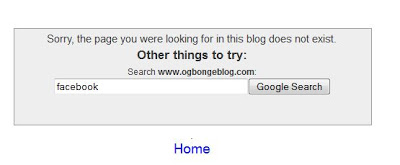
Error 404 Page: How To Customize It With Search Box On Blogger Blogs
When visitors to your blog reach a non-existent page on your blog (because they’ve clicked on a broken link, the page has been deleted, or they’ve mistyped a URL), they see a 404 Page as Blogger returns a 404 (Page Not Found) error. Confronted by a 404 page, they may then attempt to manually correct…
Written by
-
Beware of Phishing Mails That Threaten To Suspend Your Blogger Blog Within 24 Hours
Some cyber criminals are currently sending out phishing mails to some bloggers. The goal of the online identity theft is to harvest the usernames and passwords of blogs hosted on Blogger. If you are not careful, your blog might be hijacked and you might have to pay some ransom before they can restore it for…
Written by

-
How To Add Google Adsense 970×90 ad unit to Blogger Blogs
Recently, Google launched a new, larger 970×90 ad size, also known as ‘super leaderboards’, giving you the opportunity to attract brand advertisers looking for large spaces to engage with users. This larger ad size is another visually impactful placement for advertisers to promote their products and services even on wider screens. The new super leaderboard…
Written by

-
Add Google+ Comment Form In Simple Steps
Blogger has announced, Google+ comments; an alternative to the default commenting system on Blogger, available to blog authors who have upgraded their Blogger profile to Google+. Google+ Comments lets you bring the following conversations together in one place, right under your blog post: Comments made on your Blogger blog post Comments on the blog post…
Written by

-
Recent Posts Widget For Blogger Not Working? Try This
If the “Recent Posts” widget on your Blogger blog has stopped working, it’s obvious you are still using the corrupt “recent posts widget for blogger“. The widget will probably be displaying “There was an error in this gadget” on your blog. If you remove it from your blog and try adding it again, you will…
Written by

-
How To Use The New Blogger HTML Editor
Google has announced new improvements to the Blogger Template HTML Editor. It now supports line numbering, syntax highlighting, auto-indentation and code folding. The Option To “Expand Widget Templates”, in the Template “Edit HTML” Wizard, is No More. The new Template “Edit HTML” wizard replaces the single “Expand Widget Templates” option with selective gadget (“widget”) expansion.…
Written by
