
Tag: facebook
-
Fastest way to change Facebook Profile Picture on Phones
In one of my previous posts, I shared how to change facebook profile picture going from one page to another. Well, I just discovered a faster way you can change your facebook profile picture. Just visit http://www.facebook.com/editpicture.php. and upload your desired picture. I have used and confirmed this on Nokia C3. Whenever I want to…
Written by
-
Faceboook shut down rumour: source and reactions
The rumor about the “March 15, 2011” Facebook shutdown is spreading like fire on the internet, while keeping many Facebook users guessing and worried. This rumor was ignited on Saturday by an article published on the ‘Weekly World News’, a news-parody website claiming to be the source of “The World’s Only Reliable News.” Here is…
Written by

-
How to change Facebook Profile Name
If you want to change your Facebook profile name, for reasons best known to you, you can easily get it done by following some few steps. Steps Login To Your Facebook Account, via a Computer. Click on the “Account” link located by the top-right corner of your screen. Then, click on “Account Settings” as indicated…
Written by

-
How To set up Facebook email address ( something@facebook.com )
Facebook has finally launched the “Facebook email address”. Owning your @facebook.com address makes it easier for friends and family who are not on Facebook yet to connect with you, while also seeing everything you’ve ever discussed with each facebook friend as a single conversation. I have set up mine: ( ogbongz@facebook.com) , you too can.…
Written by
-
How To Create Facebook Profile Banners Online Free of Charge
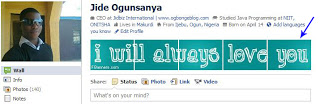
While surfing the internet, I stumbled upon a website where you can create Facebook banners, which you can use to customize your new Facebook profile and make it look more lovely. You can see what a Facebook Banner looks like in the picture below: You can get your free profile banners at www.fbanners.com. www.Fbanners.com has…
Written by
-
How To DeActivate Facebook Account
If you want to deactivate your facebook account, for reasons best known to you, you can easily get it done by following some few steps. Steps Login To Your Facebook Account. Click on the “Account” link located by the top-right corner of your screen. Then, click on “Account Settings” as indicated in the picture below:…
Written by

-
How To Chat With Facebook Friends Using Yahoo Messenger
Before now, I do use Palringo to chat with my Facebook friends but while at the Bloggers Lab yesterday, I saw a blog post of a fellow blogger, Mr Soji of “Make Money Online Nigeria” who in his post, I discovered the fact that you can now chat with Facebook friends using Yahoo Messenger. Aside…
Written by

-
How To Add Facebook Comment Form To Blogger Blogs (Template Designer layouts inclusive)
UPDATE: Please, read: https://www.ogbongeblog.com/2011/04/new-facebook-comment-form-for.html for the tutorial on the latest trick to add the improved Facebook comment form to your blogger blog. The Facebook comment box is one of the most useful tool at my blog, www.ogbongeblog.com because it has been increasing my conversations with visitors to my blog. More so, it has been contributing…
Written by

-
NetworkedBlogs: Get Traffic To Your Blog
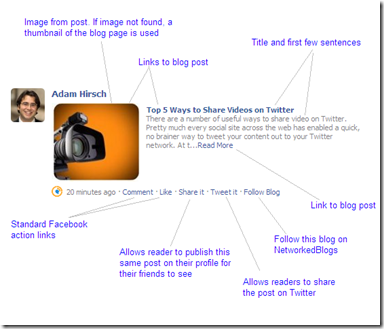
A blog without traffic is just like a dead blog. So, if you do not want to kill your blog, you just have to keep driving traffic to it. The more the traffic to your blog, the more your blog monetizations will work for you. Today, I am sharing with you, a free way of…
Written by
-
How To Change To The New Facebook Profile Design
Facebook.com has unveiled a new design for the Facebook profile page to make it easier for Facebook users to find information of friends they really care about in a visually interesting way. According to Facebook, you new profile begins with a quick summary of who you are, giving friends an easy way to see where…
Written by