Tag: facebook
-
How To Enable Facebook Status Near Location (eg near Marseille, France)
Today, I have decided to share with you, how to add “near location” to Facebook status updates. You will see a location line like ” –near Marseille, France” under Facebook status updates of people that have activated it on their Facebook profiles. Sharing your location lets you tell family and friends where you are as…
Written by
-
How To Create New Paragraph or Line Break within a Facebook Comment
You might have noticed that before now, you can easily create a new paragraph or line break within a Facebook comment by mere pressing the ENTER key on your keyboard but this is no longer the case with the new Facebook Timeline. So, what is the solution? Press shift and enter on your keyboard at the same…
Written by

-
How To Use an Alternate Name (eg nickname) in Facebook Profile Name
If you are interested in listing your second name on your Facebook account (eg nickname, professional name or maiden name), you will have to add an alternate name to your Facebook account. How To Get Started Click the account menu at the top right of your Facebook page. Choose Account Settings. Find the Name field…
Written by
-
Santa/Christmas Pictures You Can Use As Facebook Profile Pictures
Hurray, It’s XMAS. Most of my friends on Facebook are changing their profile pictures to Santa pictures. This is obviously adding more colours to Facebook walls. Today, I have decided to share with you, some of the Santa pictures you too, can use as your Facebook profile picture. Just download them and Use. Read: How…
Written by

-
How To Stop Notifications of Facebook CLOSE FRIENDS
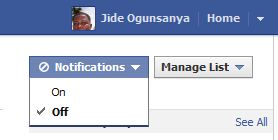
Sometimes ago, I explained how you can use the Facebook “Smart Lists and Close Friends” to organize your friends on Facebook so you can filter the stories you see in News Feed or post an update for specific people. These Facebook lists have been useful but it’s frustrating receiving notifications of Close Friends even when you…
Written by
-
Facebook Profile ID : How to get it
If you have installed the new Facebook comment form on your blog and interested in receiving Facebook notifications everytime someone comments on your blog via the Facebook comment form, you will need to add some codes to your blog html , which will require your “Facebook Profile ID“. If you insert the wrong “Profile ID in the…
Written by

-
How to Play Words For Friends Game on Facebook
“Words For Friends” is just like the popular Scrabble game. If you do not know what Scrabble game looks like, just take a close look at the picture below. You can play this game on your iPhone, iPad and Android phone. If you do not have any of these devices, you can still play the…
Written by

-
How to create a Group Chat on Facebook
Over the last year, the Facebook messages team has been working to make it easier to have one on one conversations with Facebook friends. In November 2010, Facebook launched the new messages, which brings together chats, texts, emails and messages all in one place. Today I’m excited to introduce an improvement to Facebook chat. Facebook.com has…
Written by

-
How To Add Facebook Like Box to Blogger/blogspot Blog Using html5
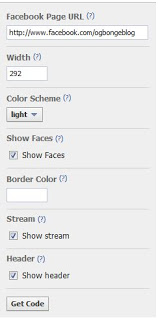
The Like Box is a social plugin that enables Facebook Page owners to attract and gain Likes from their own website or blog. The Like Box enables users to: See how many users already like this Page, and which of their friends like it too Read recent posts from the Page Like the Page with one click,…
Written by
-
New Facebook Comment form for Blogger/Blogspot Blogs( reply & notifications enabled)
UPDATE: Check the new way of adding Facebook comment plugin to Blogger blogs here. In one of my previous posts, I shared with you, How to add Facebook Comment Form to Blogger Blogs (Template Designer layouts inclusive). As at the time of publishing this post, Facebook has upgraded the comment form with the “reply” option,…
Written by