

In one of my posts, I explained how to use Payment number to trace location of Google Adsense check. Well, using the same method, you can easily get the DHL tracking number of your Google Adsense check should in case, Google is delaying in updating your Payment history page with the DHL tracking number of your Adsense check.
How To Get Started
Login to your Adsense account and click on “Payments” by the left menu. Scroll down to your current payment issued.
Then, click on the details link for the latest “payment issued”. Take note of the “Payment Number” and “Payment date“.
Now go to the link below below:
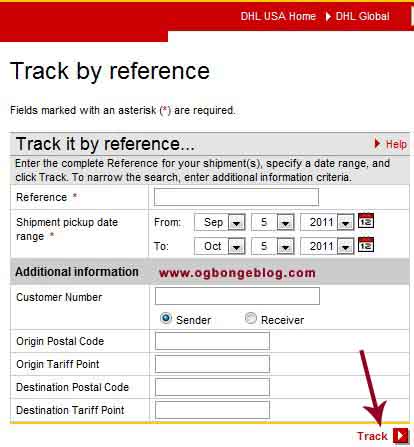
Paste your “Payment Number” in the “Reference” (Shipper’s Reference) box
For the shipment pickup date range, enter the “payment date” in your Adsense payment details for “FROM” and today’s date for “TO“. Leave the rest blank and click “Track“.
You will see a new page with detailed information about your check.
Right on the page, you will see the DHL tracking number, also known as “Waybill” number.
You can then go ahead to call DHL ( if need be) , just to know the exact current location of your check because atimes, it might already be in your town while it’s still been stated on the DHL website that it is still far from you.
I hope this helps.
Cheers!



Leave a Reply