

You can limit access to a PDF file by setting passwords and by restricting certain features, such as printing, editing, copying of texts, images and other content. There are many ways you can achieve this on Windows and Mac but in this post, I want to share with you how to password protect a pdf file without acrobat software on Windows PC.
Unlike Adobe Acrobat which will cost you money once your 30-day trial expires, you can opt for the free PrimoPDF software which also allows users to lock pdf files with password.
Once installed, PrimoPDF allows you to encrypt entire documents without any price tag. Additionally, it lets you set permission passcodes for tasks such as editing, copying, and printing.
How To Get Started
Head over to primopdf.com or filehippo.com to download primopdf software and install on your PC
Open the pdf file you want to lock, go to “File” > “Print“
If installed successfully, you should see “PrimoPDF” in the list of printers. Select it and click “Print“
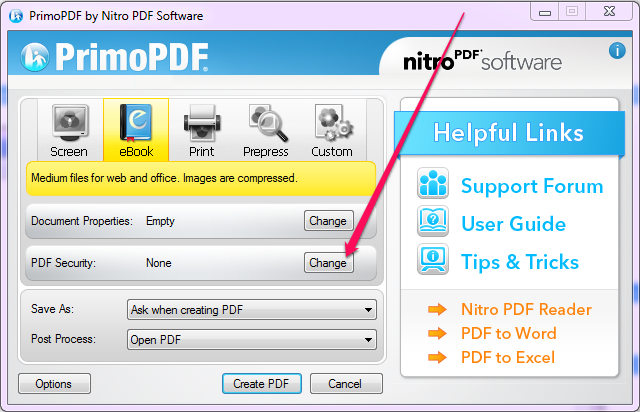
Once the software opens, click on “Change” next to “PDF Security” as seen in screenshot below :
Tick the “Open Password” and “Permissions” check boxes and set your security options as desired.
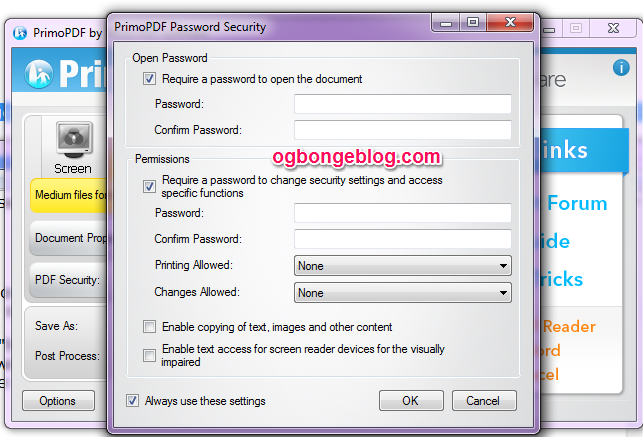
Click “OK” when you are done with the settings.
Click “Create PDF” to create the file.
Save to your desired location on your PC.
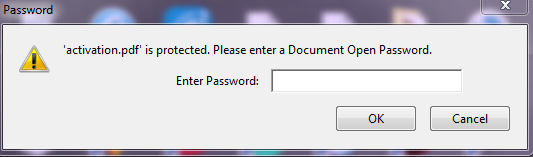
Open it and you should be prompted to enter a password as seen below:
That’s all.
You can also use PDFMate free pdf merger software and if you a Mac user, you can lock pdf file with a password on your Macbook by making use of “Preview“. It offers similar support and PDF encryption. Just “export“, check the “encrypt” box and set your password.
I hope this helps.
Recommended : How To Create PDF File


Leave a Reply to Nelson Blessing Cancel reply