
If you have spent any time on Instagram or Facebook recently, you have likely seen creators and brands using call-to-action prompts like: “Comment ‘GUIDE’ below and I’ll send you the direct download link!”
Within seconds of leaving that comment, a direct message arrives in the user’s inbox containing the requested resource. For years, running this kind of high-converting inbound marketing strategy required paying for expensive third-party automation tools including Facebook auto dm bots. Many small business owners, creators and marketers assumed automated direct messaging was out of reach without a recurring software subscription.
Fortunately, Meta provides this feature natively. You can set up workflows that respond to comments on your standard posts, video posts, and Reels completely on the house. In this guide, you will learn how to auto DM Instagram and Facebook comments free using Meta Business Suite, along with key setup requirements and optimization tips.
Why Automate Direct Messages from Facebook Comments?
Transforming post comments into private conversations is one of the most effective organic conversion strategies available today. Instead of sending followers to a generic link in your bio, where bounce rates are historically high, you meet your audience at the exact moment their interest peaks.
- Higher Algorithm Reach: When dozens or hundreds of users comment on your post to receive an asset, Meta’s algorithm interprets this surge in activity as valuable engagement, pushing your content to a broader audience on the Explore page and Feeds.
- Direct-to-Consumer Communication: Moving a follower from a public comment thread into private direct messages opens an uncrowded channel where you can nurture relationships, answer questions and drive traffic directly to sales pages.
- Zero Tool Fatigue: Utilizing Meta’s native settings removes the need to connect complex APIs, manage separate logins or worry about unexpected third-party pricing tiers as your follower count grows.
Key Prerequisites Before Setting Up Free Comment Automations On Instagram & Facebook
Before launching your automation, you must ensure your Facebook business page and Instagram account meet Meta’s administrative criteria. Because this native tool lives inside Meta Business Suite, your profiles must be properly structured for business use.
1. Switch to an Instagram Business or Professional Account
Creator and Personal Instagram accounts cannot access Meta Business Suite automations. If your profile is still set to personal, open the Instagram app, navigate to Settings and privacy > Account type and tools and switch to Business or Professional account type. Instagram Profesional/Business account is free and unlocks full automation access.
2. Link Your Instagram Account to Your Facebook Business Page
Meta’s native automation engine works on cross-platform integration. Your Instagram professional account must be directly connected to the Facebook Business Page you manage. You can link them either inside the Instagram app under your profile’s public business information (when you edit profile) or within Meta Business Suite settings under Connected Accounts.
Important Connection Checklist:
- You must have full administrative or task-based control over the Facebook Business Page.
- Ensure “Allow access to Messages” is enabled in your Instagram message settings (Settings > Messages and story replies > Message requests).
Step-by-Step: How to Auto DM Instagram and Facebook Comments Free
Setting up your workflow takes only five to ten minutes once your profiles are connected. For the best experience, complete these steps on a desktop browser rather than a mobile device.
Step 1: Open Meta Business Suite
Navigate to business.facebook.com on your desktop computer. Make sure you select the correct Facebook Business Page from the dropdown menu in the top-left corner of the dashboard.
Step 2: Navigate to Inbox Automations
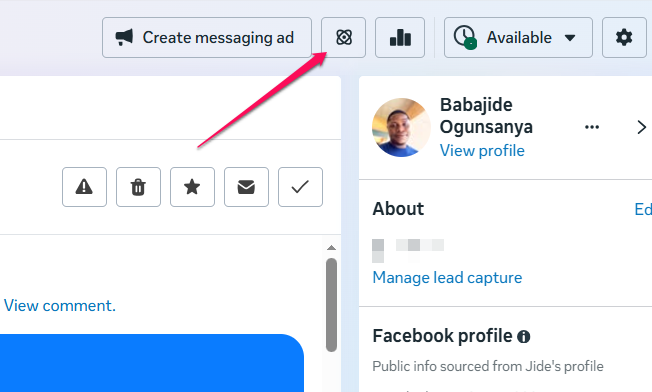
From the left-hand navigation sidebar, click on Inbox. Once your unified inbox loads, locate and click the Automations button in the top-right corner of the interface (represented by an icon with sparkles or control toggles).
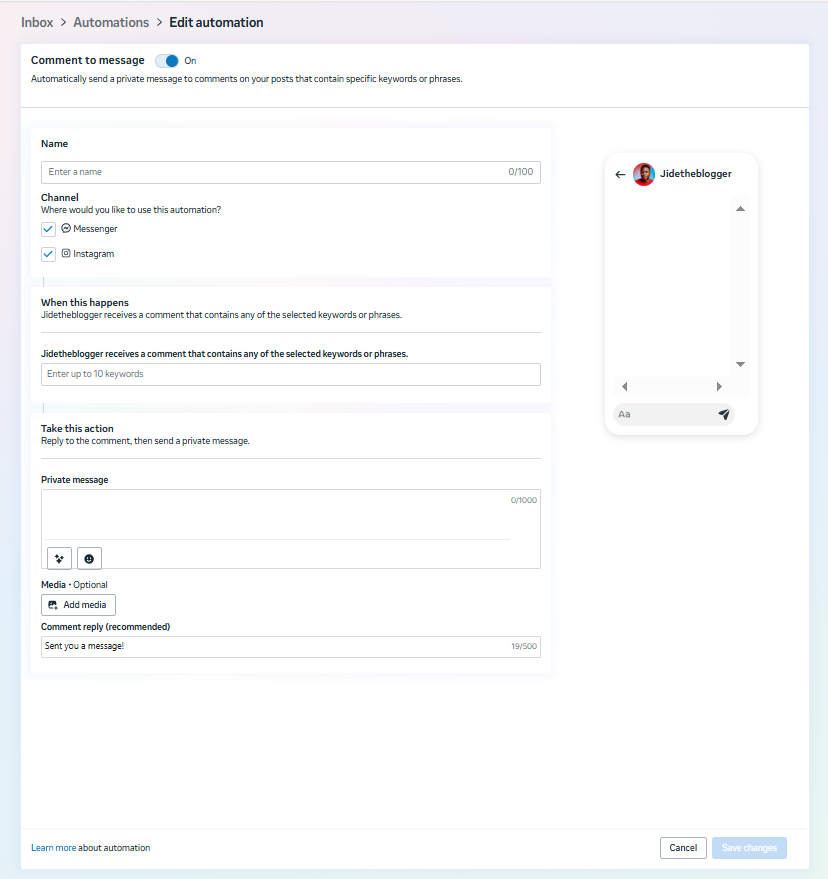
Step 3: Choose “Comment to Message”
Meta provides a library of pre-built automation templates. Browse through the available automations and select Comment to Message.
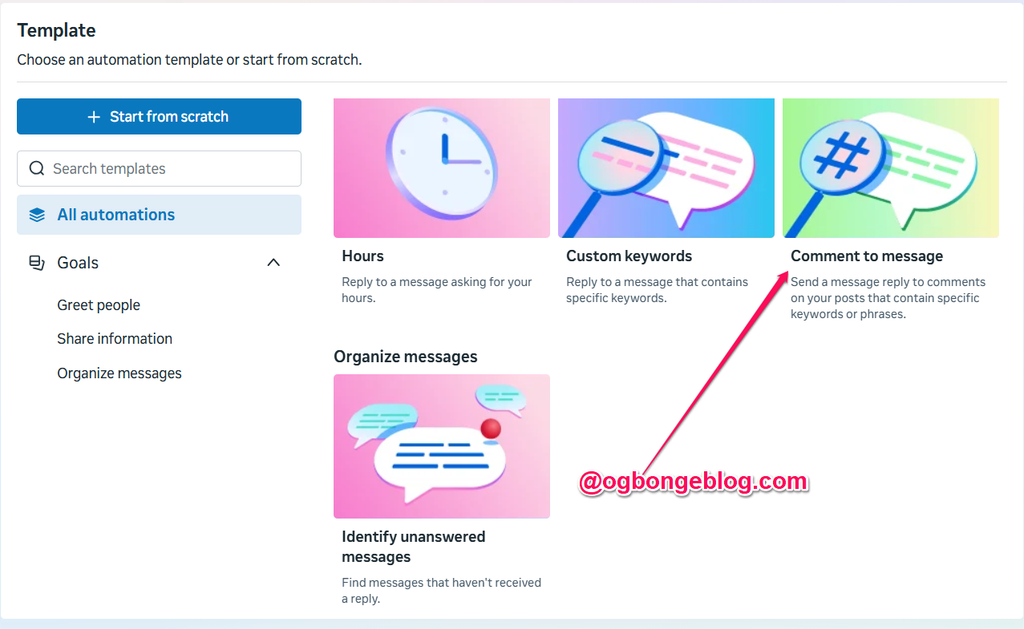
Inside the setup window, ensure you tick the checkboxes for both Facebook and Instagram so the rule applies uniformly across both platforms.
Step 4: Configure Your Trigger Keywords
Meta allows you to add up to 10 trigger keywords or phrases per automation. When a user includes any of these specific words in their comment, the automated sequence activates.
Select clear, unambiguous words relevant to your campaign. Good examples include:
- INTERESTED
- FREEBIE
- PRICE
LINKGUIDETEMPLATECHECKLIST
Note: Keywords are generally not case-sensitive, but keeping them simple reduces user typos and ensures higher delivery success.
Step 5: Draft Your Private DM and Public Reply
Now, construct the messages that will be dispatched when a trigger word is detected:
- Private Message: Write the private text your commenter will receive in their inbox. This should contain your direct link, discount code, or download URL. Keep it warm, personalized and action-oriented.
- Optional Public Comment Reply: Meta also permits you to post an automated public response directly under the commenter’s remark (for instance: “Just sent you a DM with the link! Check your message requests if you don’t see it.”). Using this public reply confirms delivery and encourages other viewers to comment as well.
Step 6: Save, Turn On, and Test
Click Save Changes at the bottom of the page and ensure you Turn On the Automation. Once live, test the workflow immediately by having a colleague or using an independent secondary account to leave a comment containing one of your designated trigger keywords on an active post or Reel. Check that the DM arrives promptly and the link functions correctly.
Best Practices to Maximize Comment Conversions
While the mechanics to auto DM Instagram and Facebook comments free are straightforward, crafting the right marketing strategy around your automations makes all the difference in actual conversion rates.
Keep the Call-to-Action Specific and Simple
Do not ask your audience to comment long sentences. Give them a single, memorable word in all-caps within your caption and on-screen Reel text: “Comment ‘FREEBIE’ below.” Shorter words lower the cognitive friction for the user and reduce spelling errors.
Address the “Message Requests” Folder
If an Instagram user does not currently follow your account, your automated DM may land in their “Hidden Requests” or “Requests” folder rather than their primary inbox. Include a friendly reminder in your post caption or your automated public comment: “Check your message requests if we’re not connected yet!”
Rotate Keywords Between Different Offers
Since Meta allows up to 10 trigger keywords, do not assign the same word to every lead magnet. Dedicate specific words to specific assets (e.g., “WORKBOOK” for a PDF resource and “DISCOUNT” for an e-commerce coupon). This keeps your messaging contextually relevant to what the user originally requested.
Key Limits of the Free Auto DM Tool
While utilizing Meta Business Suite eliminates software expenses, it is helpful to keep native platform limitations in mind when comparing it to premium alternatives:
- Keyword Cap: You can define a maximum of 10 keywords per automation trigger.
- No Complex Branching Logic: Meta’s native “Comment to Message” provides a single-step reply. If you require multi-step conversational surveys, automated qualification questionnaires, or complex conditional logic, you would eventually need dedicated software.
Conclusion
You do not need an expensive marketing tech stack to capture leads and distribute content effectively. By taking advantage of Meta Business Suite, any business owner or digital creator can auto DM Instagram and Facebook comments free. Set up your first keyword trigger today, add a clear call to action to your next Reel and turn your comments section into an automated conversion engine.
Frequently Asked Questions
Can I auto DM comments on Instagram Reels using this free method?
Yes. The Meta Business Suite “Comment to Message” automation works across standard feed posts, video uploads, and Reels published on both your linked Instagram professional account and your Facebook Business Page.
Will my Instagram account get flagged or banned for sending automated DMs?
Yes. The Meta Business Suite “Comment to Message” automation works across standard feed posts, video uploads, and Reels published on both your linked Instagram professional account and your Facebook Business Page.
Can I use this comment to message automation with a personal Instagram account?
No. You must switch your Instagram profile to a free Professional or Business account and connect it to a Facebook Business Page to unlock Meta Business Suite’s automation suite.
How many trigger keywords can I set up for free?
Meta allows you to add up to 10 trigger keywords per “Comment to Message” automation rule. These keywords can be individual words or short phrases that visitors include in their comments.
Leave a Reply