
Tag: blogger tips
-
How To Add Follow by Email Gadget to Blogger/Blogspot Blogs
I am delighted to inform you that the Blogger’s Team has introduced a new gadget called “Follow by Email“. The Follow by Email gadget provides blog authors a simple way for their readers to subscribe to the latest hot-off-the-press updates, which are delivered directly to the reader’s inbox. When new blog content is published, all…
Written by

-
Submit Blogger/Blogspot sitemaps via Google Webmaster Tools: 2 Easy Methods
UPDATE: Please, the tutorial below is outdated. Kindly click here to learn the new way you can add Blogger sitemap to Google webmaster tools here. If you blog on blogger/blogspot platform, you can now easily submit your Sitemaps using Google Webmaster tools. This enables Google to learn about the structure of your blog and to…
Written by

-
How To Add Facebook Recommendation Button To Blogger Blog
The Facebook Like/Recommendation button lets a blog visitors to share your content with friends on Facebook. When the visitor clicks the Like/Recommendation button on your blog, a story appears in the user’s Facebook friends’ News Feed with a link back to your website. There are two Like button implementations: XFBML and Iframe. This tutorial explains…
Written by
-
Import Blog Posts To Facebook Notes for Free Traffic
Via the “Import Settings” of the Facebook Notes, you can import posts from your blog so they appear along with your notes on Facebook. Facebook will automatically update your notes whenever you publish to your blog though, imported blog posts cannot be edited. I have been using this for a while now and the trick…
Written by

-
How To add Breadcrumb Navigation to Blogger/Blogspot
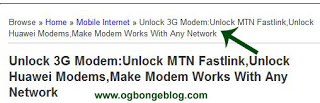
With a “breadcrumb-navigation”, readers of your blog can easily know the position of an article that’s being read and also can search the articles in the same category. If you have been reading www.ogbongeblog.com lately, you might have seen a simple row of navigation above the title of an article that you’re reading, like the…
Written by
-
How to remove Navigation Bar of Blogspot Blogs : Latest trick
Blogger’s default templates come with a default navigation bar. Hence, If you are using a default blogger template,then you will see on your blog, a navigation bar like the one in the picture below.This navigation bar can be removed using some simple CSS techniques. Here are the steps to remove the Blogger Navigation bar 1.Login…
Written by

-
How To Configure FREE Domain Name For Blogger/Blogspot Blog
If you are a blogger and interested in using a free domain name for your blogger blog before you get the money to buy a custom domain, well you can get it done by following some simple steps. With a free domain name been provided by .co.cc , you can change your blog address from…
Written by
-
Make Blogspot Blog Beautiful Using Template Designer: Turn to 3 Columns etc
With the Blogger’s “Templates Designer“, you can turn your blogspot blog to a stunning one with some few clicks. With this tutorial, you should be able to change your blog to something similar or better than www.naijaipfreedom.blogspot.com Note: You have to do this using a computer. Easier using Firefox browser. Steps. Login to your blog…
Written by

-
How To Retrieve Email Addresses Of Feedburner Email Subscriptions
If you have been using the Feedburner Email Subscription services, you might be interested in retrieving the email addresses of your subscribers. This tutorial simply explains how to go about it. Note: This tutorial is for those that are still using the Old Feedburner Interface. Steps Login to Your Feedburner account via www.feedburner.com Click on…
Written by
-
How To Create Banner For Blogs/Websites Without Adobe Photoshop
If you want to create a banner either for advertisement or to use as your blog header image, you can easily generate it online without having to worry yourself on how to use Adobe Photoshop. Using image instead of the default Blogger’s Title and Description texts will add more glamour to your blog. So, if…
Written by
