

In today’s fast-paced financial landscape, building wealth and securing your financial future no longer requires sitting in front of a traditional stockbroker’s desk. Mobile technology has made it possible to invest in global capital markets straight from your smartphone. One platform leading this revolution is Bamboo, a digital investment platform that grants users seamless access to trade U.S. and local stocks and fixed-income assets.
Whether you want to own fractional shares of tech giants like Apple, Tesla, Microsoft, Meta and Amazon or diversify your portfolio with high-yield investments, the Bamboo app offers an intuitive, secure and user-friendly gateway. In this blog post, we will walk you through everything you need to know about the Bamboo app download process, setting up your account, logging in safely, and reaching customer support whenever you need assistance.
What is the Bamboo Investment App?
Bamboo (accessible online via investbamboo.com) is a leading digital investment platform that allows Africans—starting with retail and institutional investors in Nigeria, Ghana, and across the diaspora—to trade and hold over 3,000 stocks and exchange-traded funds listed on major United States stock exchanges, including the New York Stock Exchange (NYSE) and the Nasdaq.
Rather than dealing with complicated international brokerage paperwork, exorbitant wire transfer fees, or stringent minimum capital requirements, Bamboo democratizes investing:
- Low Barrier to Entry: You can start investing with as little as $10 or its local currency equivalent.
- Fractional Shares: You do not need thousands of dollars to buy a whole share of expensive stocks. If a single share of a company trades at $500, you can purchase $20 or $50 worth of fractional shares.
- Direct Asset Ownership: Shares purchased on Bamboo are held securely in your name through regulated U.S. and local custodial partners.
- Fixed-Income & Dollar Yields: Alongside stocks, Bamboo provides access to fixed-return dollar opportunities and local equity markets where supported.

Why Invest and Trade Stocks with the Bamboo App?
Before diving into the download process, it is important to understand why millions of investors trust Bamboo to grow their wealth. The platform breaks down traditional barriers to entry in stock trading, offering features designed for both beginners and experienced investors:
- Access to Global Markets: Invest directly in publicly traded U.S. companies directly from your mobile device.
- Fractional Share Trading: You do not need thousands of dollars to buy high-value stocks. Bamboo allows you to purchase fractional shares, meaning you can start investing with as little as $10 or its equivalent in your local currency.
- Real-Time Market Data: Track live stock prices, monitor market trends, and make informed financial decisions with up-to-date market insights.
- Top-Tier Security: Bamboo uses bank-grade encryption and state-of-the-art security measures to protect your personal data and financial funds.
To learn more about their offerings and platform terms, you can visit the official Bamboo website.
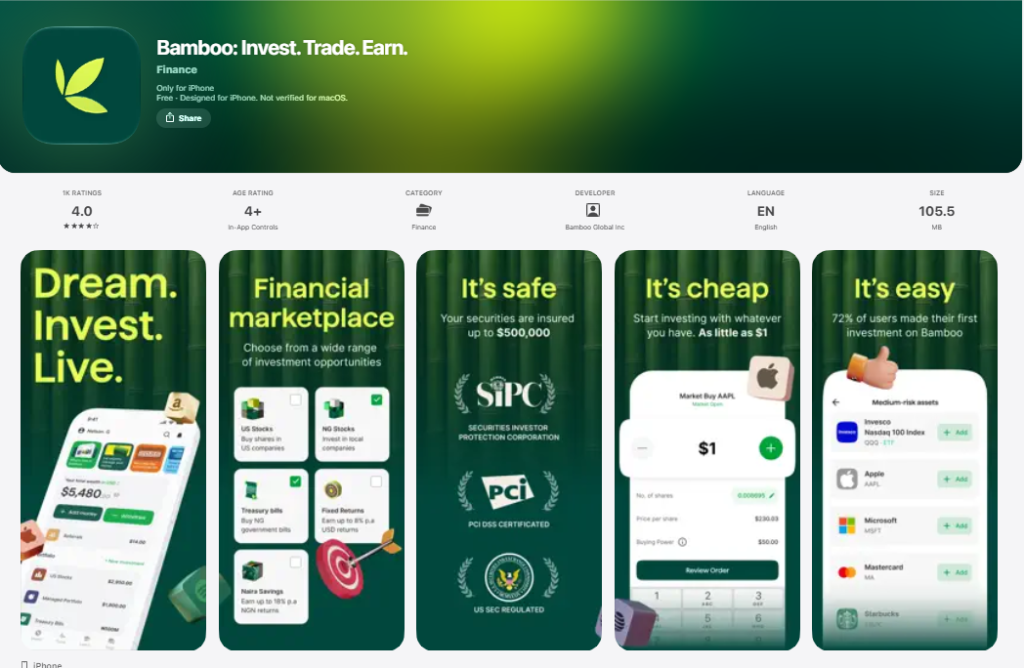
Important Security Notice: Verify the Official Bamboo Logo Before Downloading
With the rise of mobile investment applications, cybercriminals frequently create fraudulent apps designed to steal user credentials and financial details. Before downloading any file or application, always verify that you see the official Bamboo logo and check that the developer name is listed legitimately on your respective app store.
The authentic app features the recognizable, minimalist green Bamboo logo. Never download APK files from unverified third-party websites or click suspicious links sent via direct messages or unofficial emails. Always download directly from the official Apple App Store or Google Play Store links provided in this guide.
Download Bamboo Investment App for Android
If you are an Android user, getting started with stock trading takes only a few minutes. Follow these simple steps to safely download bamboo investment app for android on your mobile device:
- Open the Google Play Store on your Android phone or tablet.
- In the search bar at the top, type “Bamboo – Invest, Trade, Earn” or use the direct link below.
- Verify the App: Double-check the developer name and ensure you see the official green Bamboo logo on the app preview page.
- Tap the Install button.
- Wait for the download and installation process to complete, then tap Open to launch the app.
To jump straight to the Google Play Store listing, click here to download the Bamboo investment app for Android safely.
Bamboo App Download for iPhone
iOS users can enjoy a sleek, high-performance trading experience optimized specifically for iPhone and iPad devices. Here is the bamboo app download step-by-step guide for iphone users :
- Launch the Apple App Store on your iOS device.
- Tap the search tab and enter “Bamboo – Invest, Trade, Earn”.
- Check for Authenticity: Make sure the app displays the official Bamboo icon before tapping download to avoid counterfeit applications.
- Tap the Get or Cloud icon button.
- Authenticate the download using Face ID, Touch ID, or your Apple ID password.
- Once installed, locate the icon on your home screen and open the application.
You can access the official Apple store page directly by using this link to download the Bamboo investment app for iPhone.
Bamboo Sign Up: Creating Your Investment Account
Once you have installed the app on your mobile device, the next step is completing the bamboo sign up process. Registering an account is quick, straightforward, and compliant with standard financial security regulations.
Step-by-Step Account Registration Process
- Launch the App: Open the Bamboo app on your phone and tap on the Create Account or Get Started button.
- Provide Your Personal Details: Enter your full legal name, valid email address, phone number, and choose a strong password. Enter babajide9107 as the referral code in the Bamboo app.
- Verify Your Phone Number & Email: You will receive a One-Time Password (OTP) via SMS or email. Input the verification code into the prompt to confirm your identity.
- Complete KYC Verification: As a regulated platform, Bamboo requires Know Your Customer (KYC) documentation. You will need to enter details like your Bank Verification Number (BVN).
- Set Up Security Features: Create a secure 4-digit Transaction PIN that will be required to approve trades, withdrawals, and sensitive account changes.
After your documents are reviewed and approved, your account becomes fully active, allowing you to fund your wallet and start buying stocks.
Bamboo Sign In: How to Securely Access Your Account
After successfully registering, logging into your portfolio on a daily basis is simple. Follow these steps for a secure bamboo sign in:
- Open the app on your smartphone.
- Tap the Sign In link located at the bottom of the home screen.
- Enter your registered email address and password.
- If enabled, you may also login using 4 digits PIN code.
Tips for Keeping Your Bamboo Investment App Account Secure
- Never share your Bamboo account password or 4-digit transaction PIN with anyone, including individuals claiming to work for Bamboo.
- Always log out if you are accessing your account from a shared or non-personal mobile device.
Bamboo Customer Service & Support
If you encounter technical glitches, need help with document verification, or have questions about trade executions, responsive support is available to assist you. Reliable customer service is essential when dealing with money and financial assets.
If you require help, you can contact bamboo customer service directly via their official email channel:
- Official Bamboo Customer Support Email: support@investbamboo.com
- Official Bamboo Contact Number : +234(02) 018880295
- In-App Support: Open the Bamboo app, tap “Help” to to access the different ways you can get help for Bamboo.
Final Thoughts
Taking control of your financial destiny has never been easier. The Bamboo app provides a reliable, easy-to-use platform that bridges the gap between global stock markets and everyday investors. By downloading the official Bamboo app on Android or iPhone, completing the sign-up process, and securing your account, you can start building a diversified global portfolio today.
Remember to always verify the official green logo before downloading the app from your app store, and reach out directly to customer support at support@investbamboo.com whenever you need assistance. Start trading stocks, earning passive returns, and growing your wealth on the go!



Leave a Reply