

If you use Facebook ads to advertise online, you can easily change the currency in your Facebook ads from US dollars to any other currency e.g Naira. You can get this done easily via your Facebook Ads Account Settings.
How?
>> Sign in to Facebook.com
>> Go to your Facebook ads account settings.
>> Under Time Zone, click “Change Currency / Timezone”.
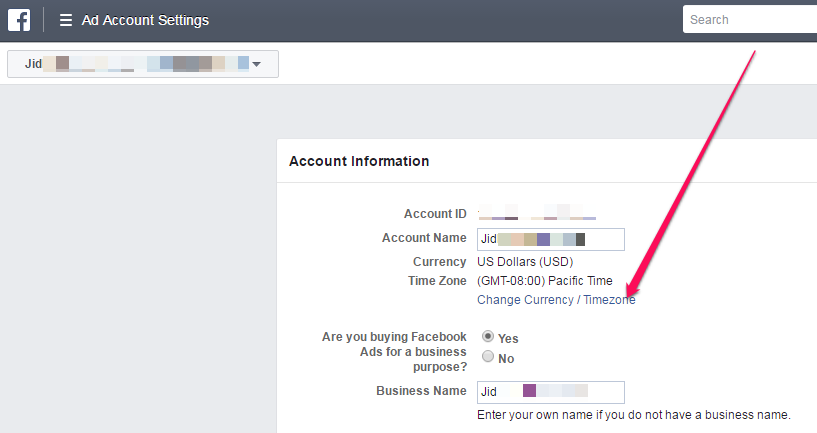
>> Select your new currency and time zone and then click “Create New Account”.
That’s all.
If the option to change fb ads currency isn’t appearing, below are the reasons :
- Your account is unsettled
- You have ads pending review
- You’ve already changed your currency twice in the past 28 days
- You’re looking at an account other than your personal ad account
Things to keep in mind about changing your Facebook ads currency:
- When you choose a new currency and time zone, you’ll create a new ad account. Your old ad account will be visible in the Account dropdown in the top left of your Ads Manager, but it’ll be closed and all ads created with your old account will stop running. Any ads you had running on the old ad account will be billed in the old currency.
- If your Facebook Business Manager account has several other accounts associated with it, it’s not possible to change your currency. You’ll need to create a new account from Business Manager with the new currency.
- Your Currency and Business Country must match. For example, if you select Naira as your currency, you should select Nigeria as your country.
- The payment methods available to you depend on the currency you choose.
If you want to advertise on Facebook in Nigeria, I do not recommend changing Facebook ads currency from dollars to Naira. Just leave it as USD. Reason is that you will not be able to pay for your Facebook ads with most Nigerian debit cards out there as most of them do not support the Facebook Naira billing.
Recommended



Leave a Reply