

Micro, Small, and Medium Enterprises (MSMEs) form the backbone of Nigeria’s economic growth. Whether you operate a fashion design studio in Lagos, trade spare parts in Aba, run a neighborhood grocery store in Kano, or offer professional digital services from home, formalizing your business is a critical milestone. To empower small business owners, the Small and Medium Enterprises Development Agency of Nigeria (SMEDAN) established a streamlined digital process to onboard enterprises across the country.
If you are looking for clear guidance on how to register for SMEDAN online online, this blog post provides everything you need.
What is SMEDAN and Who Can Register?
SMEDAN is the federal government agency established to promote, coordinate, and develop the MSME sector in Nigeria. The agency provides micro and small business operators with access to financial resources, technical training, business counseling, and policy support.
The SMEDAN business registration exercise is open to all Micro, Small, and Medium Enterprises operating in Nigeria. You do not need to run a large corporation to qualify. The registration exercise welcomes a diverse range of business owners, including:
- Artisans (carpenters, electricians, plumbers, mechanics)
- Traders and retail shop owners
- Tailors and fashion designers
- Spare part dealers
- Hairdressers, barbers, and beauty therapists
- Agricultural producers and food processors
- Tech startups and digital freelancers
- Professional service providers
Whether your enterprise is formally registered with the Corporate Affairs Commission (CAC) or is currently operating as an informal enterprise, you are encouraged to complete the SMEDAN registration process.
Key Benefits of SMEDAN Business Registration
Completing your registration unlocks a wide selection of government-backed resources and commercial advantages designed to scale your operations. Here is what registered MSMEs gain:
- Digital SMEDAN Certificate: Successfully registered businesses receive an official Digital SMEDAN Certificate that validates their operational status.
- SMEDAN ID (SUID): Every registered business receives a unique identification number. This SUID serves as an official credential when applying for government grants, low-interest loans and federal intervention funds.
- SMEDAN GrowIt Marketplace Access: Your SUIN grants you permission to register as a verified seller on the SMEDAN GrowIt Marketplace, opening up nationwide commercial channels.
- Subsidized Corporate Discounts: Registered business owners enjoy subsidized access to special discounts on products and services offered by corporate brands partnering with SMEDAN.
- Business Development Support (BDS): Access specialized Business Development Support services, including personalized business mentorship, legal guidance, and financial counseling.
- Free Entrepreneurship Courses: Gain free access to practical training programs covering business management, bookkeeping, digital marketing, and financial literacy.
- Automatic Event Participation: Registered business owners gain automatic eligibility to participate in SMEDAN national MSME conference, SMEDAN trade fair and workshops.
SMEDAN Registration Requirements
Before you begin filling out the application form online, ensure you have gathered the required business and personal details. Preparing these details in advance makes the application process smooth and fast.
Here are the standard smedan registration requirements:
- Business Name: Your official registered business name or trading name.
- Contact Details: A valid email address and active phone number.
- Business Operating Address: Physical location of your shop, office, or operational base (including State and Local Government Area).
- Ownership Information: Full name, gender, date of birth and NIN of the enterprise owner.
- Sector/Industry Classification: The specific sector your business belongs to (e.g., Fashion, Automotive, Agriculture, Retail, ICT).
- Staff Strength: Total number of individuals employed by your business (helps categorize your business as Micro, Small, or Medium).
- Date of Business Commencement: The exact or estimated date you started operating.
- CAC Registration Number (Optional): Required if your business is registered with the Corporate Affairs Commission. If you are an informal business without CAC registration, you can still complete the registration.
SMEDAN Registration Portal and Step-by-Step Application
The official smedan registration portal is designed to be user-friendly, fast, and accessible on both mobile smartphones and desktop computers. Best of all, registration is 100% FREE, you do not need to pay any agent or third party.
How To Register for SMEDAN Online
Follow these simple steps to complete your registration form online:
- Visit the SMEDAN registration portal: Open your web browser and go directly to the main portal at https://portal.smedan.gov.ng.
- Access the Registration Form: To go straight to the registration page, navigate directly to the official smedan registration form at https://portal.smedan.gov.ng/signup. Enter your first name, last name, email address, password and click REGISTER.
- Select Business Ownership Type: You would be redirected to a page where you would be asked to indicate whether your business is a sole proprietorship, partnership, limited liability company, or informal enterprise.
- Fill in Business Information: Input your business name, address, state, local government area, and select your operational industry.
- Enter Employment Details: Select your employee count. Enterprises with 1–9 staff are classified as Micro, 10–49 as Small, and 50–199 as Medium.
- Provide Personal Identification: Input your contact details, including your full name, phone number, and active email address.
- Review and Submit: Carefully check all details to ensure there are no typographical errors, then click the submit button.
- Verify Your NIN and Take a Selfie: Enter your National Identification Number (NIN) and take a clear selfie when prompted to complete the verification process.
- Confirm Your Email Address: Check your inbox for a welcome email from SMEDAN. Click the confirmation link in the email to verify your email address.
- Wait for Registration Approval: SMEDAN will review your application. If your registration is successful, you will receive another email containing a link to download your SMEDAN certificate.
How To Get SMEDAN ID (SUID) Number
Once your SMEDAN registration is approved, a unique SMEDAN ID (SUID) will be generated for you. You can log in to the SMEDAN portal to view and copy your SUID. Your SUID will also be clearly displayed on your SMEDAN certificate.
How to Download Your SMEDAN Certificate
Once your SMEDAN registration is approved, your certificate is generated immediately within your portal account.
To download or retrieve your SMEDAN certificate:
- Return to the main portal at https://portal.smedan.gov.ng.
- Log in using the email address and password created during registration.
- Navigate to your account dashboard.
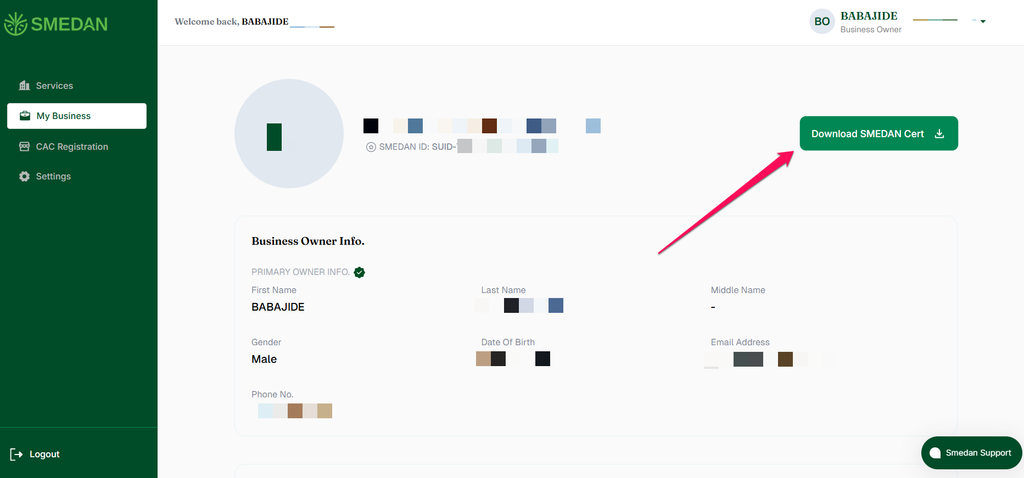
- Click on “My Business“
- Click on the “Download SMEDAN Certificate” button.
- Save the high-resolution PDF file to your phone or computer and print a copy for your business records.
Leveraging Your SMEDAN Registration for Enterprise Growth
Obtaining your SUIN and certificate is only the first step. To get the maximum value from your registration, actively explore the opportunities available inside the portal. List your products on the SMEDAN GrowIt Marketplace to reach new customers, enroll in free online entrepreneurship modules to sharpen your business skills and check the portal regularly for announcement on corporate discounts, trade expos and subsidized funding schemes.
Conclusion On How To Register for SMEDAN
Learning how to register for SMEDAN is one of the easiest and most valuable steps any Nigerian entrepreneur can take. Registration costs nothing, takes less than ten minutes, and provides immediate official recognition alongside access to grants, educational resources, marketplace channels, and business support services. Visit the official portal today to register your enterprise and position your business for long-term growth.
Frequently Asked Questions
Is SMEDAN Registration Free?
Yes, SMEDAN registration is 100% FREE. The agency does not charge any application or processing fees to register your business, obtain a SUIN, or download your Digital SMEDAN Certificate online.
What is the SMEDAN Unique Identification Number (SUIN)?
The SUIN is a unique tracking code assigned to your business upon completing registration on the SMEDAN portal. It serves as official proof of your business registration status and is frequently required when applying for government grants, MSME loans, and federal empowerment programs.
Can I register on SMEDAN if my business does not have a CAC registration?
Yes. Unregistered and informal businesses including local artisans, tailors, traders, and sole operators are fully eligible to register on the SMEDAN portal. A CAC registration number is optional during the sign-up process.
Where can I access the official SMEDAN signup form?
You can access the official registration page directly by visiting https://portal.smedan.gov.ng/signup on any internet-connected device.


Leave a Reply