

You can now create a custom favicon for your blogger blog, right from your Blogger dashboard. This means you can now use any picture to serve as your own custom favicon instead of the blogger icon which is the default for blogger blogs. Blogger automatically generates the favicon for you from any picture you upload without you adding any code to your blog.
So. How do I do this?
Login to your blogger blog.
Go to Design and click on the “Page Elements” tab. You should see the “Favicon” as seen in the picture below:
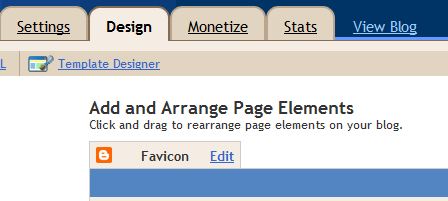
Click on “Edit“
Another window will pop up. Click on the “choose File” button
Select the picture you want to use from your computer.
Then click SAVE.
That’s all.
You should now be seeing your custom favicon next to your blog address in your browser.
NOTE: if you see error message that your image is not a square image, go to http://tools.dynamicdrive.com/favicon/ to convert your image to an icon. Download it to your pc, then re-upload it to your blog as explained above.
Feel free to check out other Blogger tricks here.
If you have any question to ask or just want o say something with regards to this, feel free to use the comment form.
Cheers!



Leave a Reply